Wednesday, February 18, 2009
Coffee - the disclosure
I've included some Ads for coffee makers in the essential tools area for developers. However, wraptinweb presents an amusing little video on how coffee affects us (well, I recognise a little of me anyway).


Sunday, February 15, 2009
Essential PC Repair & Tune Utilities
Files and Directory
There is an Australian software Company Technibble that has put together a free PC Repair and Tune Kit. The Computer Repair Utility Kit is a combination of computer repair tools in one easy to use pack. The Computer Repair Utility Kit allows you to run all of the repair tools from your portable drive (eg. USB Flash Drive, External Hard Drive, IPod etc.) and comes with an easy to use, right-click menu. A must in any computer technicians kit. Some of my favourite routines are indexed below.CCleaner gives your PC a tune-up by removing unnecessary files and registry information, freeing up valuable disk space and making your machine run faster.
Installation required: No - Level: Beginner
Via ReadWriteWeb
DriveimageXML allows you to backup your entire PC contents, so it can used in emergencies or for recovery of individual files.
Level: Expert - Installation required: No
Via ReadWriteWeb
Double KillerDouble Killer helps you find and easily remove duplicate files which are using unnecessary disk space.
Level: Beginner - Installation required: No
Via ReadWriteWeb
Deep Burner makes it easy to backup information to a CD or DVD
Level: Intermediate - Installation required: No
Via ReadWriteWebJkDefrag reorganizes files on your PC to improve performance.
Level: Intermediate - Installation required: No
Via ReadWriteWebThe PC Decrapifier uninstalls many of the common trialware and annoyances found on PCs when you bring them home from the store. A list of software that it can detect and remove can be found here. PC Decrapifier displays a list of software it detects and then lets you choose what you want removed.
Level: Basic - Installation required: No
Via ReadWriteWeb
Restoration recovers files which have been deleted from your PC, memory cards or MP3 players. It also works with FAT and NTFS as well as digital cameras cards.
Level: Intermediate - Installation required: No
Via ReadWriteWeb
Diagnosis
Autoruns provides information about all applications which are automatically started by Windows at boot time or when you log in.
Level: Expert - Installation required: No
Via ReadWriteWeb
Dial-a-fix is an advanced utility for 32-bit versions of Microsoft Windows that repairs Windows files and registries; fixing common problems easily.
Level: Expert - Installation required: No
Via ReadWriteWeb
Game Key Revealer retrieves the CD-Key and serial numbers for all installed games on your computer allowing you to easily.
Level: Beginner - Installation required: No
Via ReadWriteWeb
GPU-Z lets you view information about the graphics component of your PC.
Level: Intermediate - Installation required: No
Via ReadWriteWeb
HWMonitor lets you easily see temperatures of the main components of your PC.
Level: Beginner - Installation required: No
Via ReadWriteWeb
LSPFix restores Internet access caused by faulty Layered Service Provider software.
Level: Expert - Installation required: No
Via ReadWriteWeb
ProduKeyProduKey is a small utility that displays the ProductID and the CD-Key of MS-Office, Windows, Exchange Server, and SQL Server installed on your computer. This utility can be useful if you lost the product key of your Windows/Office, and you want to reinstall it on your computer.
Level: Beginner - Installation required: Yes
Via ReadWriteWeb
System Information gathers detailed information about your system properties and settings, and then displays it in an extremely comprehensible manner.
Level: Beginner - Installation required: No
Via ReadWriteWeb
TreeSize Free allows you to view the amount of disk space used by any folder on your PC. Because scanning is done in a thread, you can see results as the application is running.
Level: Intermediate - Installation required: No
Via ReadWriteWeb
Unknown Devices helps you determine what those unknown devices in Device Manager really are if Windows can't figure it out by itself.
Level: Expert - Installation required: No
Via ReadWriteWebWirelessKeyView
WirelessKeyView retrieves the type and value of previously used wireless network keys/passwords stored in your computer, then lets you easily save all the information to a text/html/xml file.
Level: Beginner - Installation required: No
Via ReadWriteWeb
MiscellaneousDouble Driver allows the device drivers that came with your PC when you bought it to be backed up. Useful when the Windows Operating System has to be reinstalled which in turn requires the device drivers to be reinstalled.
Level: Expert - Installation required: No
Via ReadWriteWeb
HijackThis scans your computer to find settings that may have been changed by spyware, malware or other unwanted programs.
A separate application called HijackReader reads the log files create by HijackThis and provides advice on what to do.
Level: Expert - Installation required: No
Via ReadWriteWeb
JavaRa removes old and redundant versions of the Java Runtime Environment (JRE).
Level: Expert - Installation required: No
Via ReadWriteWeb
Revo Uninstaller helps you easily remove unwanted programs installed on your computer even if you have had problems uninstalling them from "Windows Add/ Remove Programs."
Level: Intermediate - Installation required: No
Via ReadWriteWeb
VistaTweaker is a complete tweaking utility designed for Windows Vista allowing you to change settings that can not be changed by using Control Panel.
Level: Intermediate - Installation required: No
Via ReadWriteWeb
Friday, February 13, 2009
Ubuntu Linux Utilities
Ark
via TechRepublicThe Ark application is often overlooked, especially by Linux veterans. Ark is an archival manager. When you click on an archive package link (.tg, .tgz, etc) in your browser, you typically can either save the file or open the file with Ark. Most users just save the file and then drop into the command line and use the tar utility to unpack the archive. Ark can handle the same task quickly and cleanly? When efficiency becomes a necessity, tools like Ark should not be overlooked, even by expert users. One nice aspect of Ark is that you can open an archive and extract a single file from the package without actually unpacking the file. This can be done from command line but it’s much easier (for most) to have a GUI that lets you right-click a file and select Extract.
Floola
via TechRepublic
Floola doesn't have all the functions that iTunes has. Floola offers Photo support, Snarl (Windows only) support, Growl (Mac only) support, Notes, repair iPods, export lists to HTML, language support, lyrics, duplicate and lost file search, artwork support, video support, Google calendar support, playlists, podcast, lastfm support, and more. Floola is simple to use in Linux, as it comes in an executable binary that you can simply copy to the /usr/bin directory and run with the command Floola.
Nano
via TechRepublicNano has become a favorite editors for many that used Pico, until Pico was crippled by licensing issues. Nano took Pico’s place. Nano is an ncurses-based text editor that is far easier to use than either vi or emacs. Nano takes Pico and improves it, offering UTF-8 support, better color syntax highlighting, copy text without cutting, verbatim input, repeat last search, spell check, indent marked text, search within file browser, and more. Nano works within any terminal window, has a very small footprint, and is reliable. Nano is simple to install on nearly any distribution.
Tea
via TechRepublicTea is a text editor for programmers and handles most languages. Tea was created with bits of GPL’ed code from a number of other applications to create a one-stop-shop for coders. Tea supports built-in file manager, spell check, built-in search, tabbed layout, multiple encodings, code snippet/session/template support, OpenDoc, RTF, Kword, Abiword, OpenOffice support, SRT-subtitle preview, text analyzer, key customization, HTML tools, bracket matching, Wikipedia/Docbook/LaTeX support, string-handling functions, bookmarks, and more.
Transkode
via TechRepublic
Sticking with the multimedia theme, Transkode is a front end for the highly flexible, modular command line toolset Transcode [with a 'c' not a 'k']. Transcode is one of the most versatile audio and video converting tools available. Transcode has both a graphical and a text-only interface and supports a vast number of formats including DV, MPEG-2, MPEG-2 Part 2, H.264, Quicktime, AC3, and any format included under libavcodec. Transcode can import DVDs on the fly and record from Video4Linux devices. The problem with Transcode is that the commands can get a bit overwhelming for the average user. Transkode remedies this by employing a user-friendly interface that makes the complex business of converting multimedia format files as simple as it can be.
Transmission
via TechRepublicTransmission is a reliable and efficent bit torrent client that makes for simple torrent management. To seed the client, you simply have to click the torrent link to open up Transmission. In enterprises where large-scale data transmission is a must, employing applications like Transmission can enable end users or clients to download large pieces of data much more easily. We can only get our updates of Red Hat and Fedora Linux reliably by Bit-Torrent. A client like Transmission is a must.
TinyCA
via TechRepublicThe command-line creation of certificate authorities requires serious accuracy at the keyboard. The TinyCA application takes care of all of that typing for you. With TinyCA, you can create unlimited CAs and SubCAs, server and client certificates with multiple language support. If your IT department needs a CA management tool, you should look at TinyCA first. TinyCA is open source, written in Perl/Gtk, and works with OpenSSL.
Shutter
Shutter is a feature-rich screenshot program. You can take a screenshot of a specific area, window, your whole screen, or even of a website - apply different effects to it, draw on it to highlight points, and then upload to an image hosting site, all within one window.It is with a new development team that is clearly working on ease of use and user interface from release 0.7 onwards.

Monday, June 02, 2008
Adobe launch high quality, free online Office suite
SOHO tools are developing fast. I will trial this and report.
Adobe’s Acrobat.com could be an Office killer; Will interface matter? | Between the Lines | ZDNet.com
Adobe’s Acrobat.com could be an Office killer; Will interface matter? | Between the Lines | ZDNet.com
On Monday, Adobe unveiled Acrobat.com, a suite that allows you to create word processing documents, share files, convert PDFs and hold Web conferences.
Simply put, Acrobat.com is the best looking online office suite on the block (Techmeme). Google Docs, Zoho and other entrants look fine, but don’t exactly stretch the imagination with the interface. Using Flash, Adobe’s suite, which includes Buzzword word processor, PDF converter and Web conferencing applications, is slick. Adobe’s online applications easily pass–and often top–what you’d find on the desktop. In fact, Adobe’s ConnectNow seems to be the killer app in the suite and could be a threat to WebEx.
Friday, May 16, 2008
Open Source Multitouch Overlay - Exciting and Multiplatform
Gizmodo does it again ... look at what they have found! Demo videos at link.
Multitouch Goodness: Full-Screen Multitouch Mac OS X Is Here (But Not from Apple)
It's not from Apple, but it gives a pretty good idea of what to expect from them, especially knowing that only one guy—Christian Moore—got this system running at full speed on a simple Intel-based MacBook. His Lux free open framework enables true multitouch interaction in Mac OS X. In fact, he says it can work under any platform and even a web browser, enabling complex user interfaces and object manipulation comparable to Jeff Han's magic walls or the Microsoft Surface anywhere. We talked with Moore about how it works and what to expect from it.
Wednesday, May 14, 2008
Creating Music online - it gets better
Free Music Studio Means No More Excuses | Listening Post from Wired.com
A new online facility tested by wired.com. See the report and an online demo. Wired said:
"Virtual instruments may be going the way of recorded music: free and online.
We've seen plenty of sites that let you make or mix music in a rudimentary way, but none that offer the deep feature set of Hobnox AudioTool. This free online electronic music studio lets you compose with two TB-303 Bass Line generators, Roland TR-808 and TR-909 drum machines and two banks of effects pedals including three delays, crusher, detune, flanger, reverb, a parametric equalizer and a compressor. By clicking the mouse button, you can drag virtual cables between any output and any input to customize the setup."
Saturday, February 10, 2007
Print large Versions of Your Posters
HowTo: Free and Huge custom poster for your wall » MakeUseOf.com
how to create, huge(up to 20 meters), awesome looking, rasterized wall posters using previously mentioned Rasterbator. It’s free and easy to use piece of software and the whole procedure won’t take you more then 5-10 min(not incl. poster printing and putting it on your wall). Enjoy!
powered by performancing firefox
Tuesday, January 16, 2007
Video player - just about any format
Different file types have different functions, focusing on fidelity, picture quality, compression, et al., but who really wants to clog up precious hard drive space by downloading a million different media players?
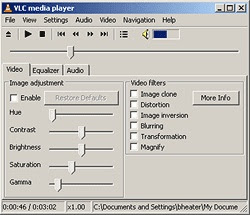
That's where VideoLAN's open-source VLC media player comes in. It may not the most feature-packed or intuitive player, and without the user-made WinAMP-esque skins, it's not much to look at, but one thing's for sure, this scrappy little media player can play just about any format that you can throw at it. The list of files that this thing can handle goes on forever, including, among others, 3gp[6], ASF, AVI, FLV, MKV, MOV (QuickTime), MP4, NUT, Ogg, OGM, Wav, MPEG-2 (ES,PS,TS,PVA,MP3), AIFF, Raw audio, Raw DV, FLAC, 3ivx, Cinepak, DivX, DV, H.263, H.264/MPEG-4 AVC, HuffYUV, Indeo 3[7], MJPEG, MPEG-1, MPEG-2, MPEG-4, RealVideo[8] , WMV, and Xvid files. It can also play your DVDs and VCDs. Not all of the different OS versions of the software support all of the aforementioned file support, but considering that VLC supports 15 different operating systems (Mac, Windows, Linux, et al.), that shouldn't come as too large a shock.
VLC 8.6, introduced last Sunday, fixes a few bugs, and adds Windows Media Video 9 and Flash Video compatibility, among other things.
Found thanks to appscout
 |
| From Clipart Blog ... |
That's where VideoLAN's open-source VLC media player comes in. It may not the most feature-packed or intuitive player, and without the user-made WinAMP-esque skins, it's not much to look at, but one thing's for sure, this scrappy little media player can play just about any format that you can throw at it. The list of files that this thing can handle goes on forever, including, among others, 3gp[6], ASF, AVI, FLV, MKV, MOV (QuickTime), MP4, NUT, Ogg, OGM, Wav, MPEG-2 (ES,PS,TS,PVA,MP3), AIFF, Raw audio, Raw DV, FLAC, 3ivx, Cinepak, DivX, DV, H.263, H.264/MPEG-4 AVC, HuffYUV, Indeo 3[7], MJPEG, MPEG-1, MPEG-2, MPEG-4, RealVideo[8] , WMV, and Xvid files. It can also play your DVDs and VCDs. Not all of the different OS versions of the software support all of the aforementioned file support, but considering that VLC supports 15 different operating systems (Mac, Windows, Linux, et al.), that shouldn't come as too large a shock.
VLC 8.6, introduced last Sunday, fixes a few bugs, and adds Windows Media Video 9 and Flash Video compatibility, among other things.
Found thanks to appscout
Tuesday, January 09, 2007
Just one more word on fonts
An interesting under-the-radar review by an expert - a little dated but many links still function, and helpful hints about "free" sites that have charges. I haven't seen any other sector that seems quite as bad for this sort of behaviour. font archives.
Crossover 6 Released for Mac & Linux
Just received from Crossover:
www.codeweavers.com
I am very happy to announce that we have shipped final versions of
CrossOver Mac 6.0 and CrossOver Linux 6.0.
Users of Intel based Mac systems can now seamlessly run many
Windows applications on their Mac without needing a Windows license.
Supported applications include Outlook, Visio, Project, Quicken, Steam based games
such as Half Life 2, and many more.
For Linux users, we have added support for Outlook 2003, World of Warcraft,
a range of Steam based games such as Half-Life 2, and a number of other
applications. Additionally, CrossOver 6 represents another major step
forward in the evolution of Wine, so most users will find substantial
improvements in the overall compatibility and behavior of CrossOver
as compared to version 5.
With the addition of games to our lineup, we felt that 'CrossOver Office'
was no longer an appropriate name, so we have also rebranded the Linux product
as 'CrossOver Linux'.
www.codeweavers.com
I am very happy to announce that we have shipped final versions of
CrossOver Mac 6.0 and CrossOver Linux 6.0.
Users of Intel based Mac systems can now seamlessly run many
Windows applications on their Mac without needing a Windows license.
Supported applications include Outlook, Visio, Project, Quicken, Steam based games
such as Half Life 2, and many more.
For Linux users, we have added support for Outlook 2003, World of Warcraft,
a range of Steam based games such as Half-Life 2, and a number of other
applications. Additionally, CrossOver 6 represents another major step
forward in the evolution of Wine, so most users will find substantial
improvements in the overall compatibility and behavior of CrossOver
as compared to version 5.
With the addition of games to our lineup, we felt that 'CrossOver Office'
was no longer an appropriate name, so we have also rebranded the Linux product
as 'CrossOver Linux'.
Monday, January 08, 2007
Lookalike fonts
Interesting for designers wanting a free font that is similar to a commercial one.
Which fonts look most like Helvetica? What's a good substitute if you can't find Staccato? Many times companies will produce their own versions of another font. Occasionally the names will be similar such as Lithos and Lithographic. But often the names are totally dissimilar as in Perpetua and Lapidary 333. This list will help you find many of these lookalike fonts, font aliases, clones, and close-match fonts. It's not a comprehensive list by any means, but it is a start and encompasses typefaces from many well-known sources including Monotype, Bitstream, Adobe, Corel, and Linotype AG.
Which fonts look most like Helvetica? What's a good substitute if you can't find Staccato? Many times companies will produce their own versions of another font. Occasionally the names will be similar such as Lithos and Lithographic. But often the names are totally dissimilar as in Perpetua and Lapidary 333. This list will help you find many of these lookalike fonts, font aliases, clones, and close-match fonts. It's not a comprehensive list by any means, but it is a start and encompasses typefaces from many well-known sources including Monotype, Bitstream, Adobe, Corel, and Linotype AG.
Friday, December 29, 2006
Tag music with name and artist
Thanks to freemacware.com I've been finding some great utilities. Some run in Linux and windows.
One can easily have items in the iTunes library labeled “Unknown Artist” or “Untitled 1″. Sometimes this happens because the music was grabbed from P2P networks and wasn’t tagged correctly, or a CD was imported when there was no internet connection to grab the titles, artists, genre, etc. or radio was recorded.
iEatBrainz is the answer. It is an acoustic music tagger — it takes an acoustic fingerprint of each song and matches it against information from MusicBrainz.org. It is available from Jay Tuley.
One can easily have items in the iTunes library labeled “Unknown Artist” or “Untitled 1″. Sometimes this happens because the music was grabbed from P2P networks and wasn’t tagged correctly, or a CD was imported when there was no internet connection to grab the titles, artists, genre, etc. or radio was recorded.
iEatBrainz is the answer. It is an acoustic music tagger — it takes an acoustic fingerprint of each song and matches it against information from MusicBrainz.org. It is available from Jay Tuley.
Subscribe to:
Posts (Atom)