Saturday, February 10, 2007

Print large Versions of Your Posters


HowTo: Free and Huge custom poster for your wall » MakeUseOf.com

how to create, huge(up to 20 meters), awesome looking, rasterized wall posters using previously mentioned Rasterbator. It’s free and easy to use piece of software and the whole procedure won’t take you more then 5-10 min(not incl. poster printing and putting it on your wall). Enjoy!


powered by performancing firefox

Tuesday, January 16, 2007

Video player - just about any format

Different file types have different functions, focusing on fidelity, picture quality, compression, et al., but who really wants to clog up precious hard drive space by downloading a million different media players?
From Clipart Blog ...

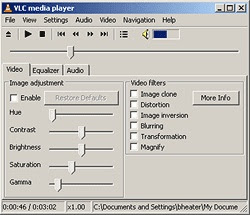
That's where VideoLAN's open-source VLC media player comes in. It may not the most feature-packed or intuitive player, and without the user-made WinAMP-esque skins, it's not much to look at, but one thing's for sure, this scrappy little media player can play just about any format that you can throw at it. The list of files that this thing can handle goes on forever, including, among others, 3gp[6], ASF, AVI, FLV, MKV, MOV (QuickTime), MP4, NUT, Ogg, OGM, Wav, MPEG-2 (ES,PS,TS,PVA,MP3), AIFF, Raw audio, Raw DV, FLAC, 3ivx, Cinepak, DivX, DV, H.263, H.264/MPEG-4 AVC, HuffYUV, Indeo 3[7], MJPEG, MPEG-1, MPEG-2, MPEG-4, RealVideo[8] , WMV, and Xvid files. It can also play your DVDs and VCDs. Not all of the different OS versions of the software support all of the aforementioned file support, but considering that VLC supports 15 different operating systems (Mac, Windows, Linux, et al.), that shouldn't come as too large a shock.

VLC 8.6, introduced last Sunday, fixes a few bugs, and adds Windows Media Video 9 and Flash Video compatibility, among other things.
Found thanks to appscout

Tuesday, January 09, 2007

Just one more word on fonts

An interesting under-the-radar review by an expert - a little dated but many links still function, and helpful hints about "free" sites that have charges. I haven't seen any other sector that seems quite as bad for this sort of behaviour. font archives.

Crossover 6 Released for Mac & Linux

Just received from Crossover:
www.codeweavers.com

I am very happy to announce that we have shipped final versions of
CrossOver Mac 6.0 and CrossOver Linux 6.0.

Users of Intel based Mac systems can now seamlessly run many
Windows applications on their Mac without needing a Windows license.
Supported applications include Outlook, Visio, Project, Quicken, Steam based games
such as Half Life 2, and many more.

For Linux users, we have added support for Outlook 2003, World of Warcraft,
a range of Steam based games such as Half-Life 2, and a number of other
applications. Additionally, CrossOver 6 represents another major step
forward in the evolution of Wine, so most users will find substantial
improvements in the overall compatibility and behavior of CrossOver
as compared to version 5.

With the addition of games to our lineup, we felt that 'CrossOver Office'
was no longer an appropriate name, so we have also rebranded the Linux product
as 'CrossOver Linux'.

Friday, December 29, 2006

Tag music with name and artist

Thanks to freemacware.com I've been finding some great utilities. Some run in Linux and windows.

One can easily have items in the iTunes library labeled “Unknown Artist” or “Untitled 1″. Sometimes this happens because the music was grabbed from P2P networks and wasn’t tagged correctly, or a CD was imported when there was no internet connection to grab the titles, artists, genre, etc. or radio was recorded.

iEatBrainz is the answer. It is an acoustic music tagger — it takes an acoustic fingerprint of each song and matches it against information from MusicBrainz.org. It is available from Jay Tuley.

Thursday, December 28, 2006

Fantastic News - Looking Glass Desktop released for Linux and Windows

I've been waiting for this news since the first concept release. Linux desktops now come of age. The Ubuntu system has a version dedicated.


Sun's Looking Glass 3D Desktop Released - News and Analysis by PC Magazine

Looking Glass, which was first shown off in 2003 and released as an open-source project in 2004, allows users to run a Java-based desktop environment on top of Windows, or on Linux or Solaris. The software allows certain applications to be run in a "2.5D" environment, allowing them to be rotated in 3D space to maximize the available desktop space.

The interface also includes a launch bar along the bottom middle of the screen, similar in appearance to the Apple OS X's Dock.

According to the developers, Looking Glass includes several interesting features not included in either the Apple or Windows OSes: the ability to "fly" left or right to a new virtual desktop, or to use the "back" of a virtual window. Windows can also be organized on their "side," allowing a "bookshelf" view of the available windows.

Looking Glass Interface -- Shared Workspace View

Users can download the new Looking Glass interface from Sun's Web site.


powered by performancing firefox

Wednesday, August 30, 2006

testing performance of php vs perl vs perl cgi

Keith Winston reports on a test he conducted comparing the three typical open source tools. I expected php to perform well because it supports some pretty high performance sites in real life. The full report is linked, but the essentials are clipped here.

NewsForge | LAMP vs. LAMP
That said, the results of these tests show that for many common Web programming tasks, PHP (mod_php) has a slight performance edge over Perl (mod_perl), based on the majority of the HTML generation tests. In the MySQL test, PHP also edged out Perl. I suspect the MySQL results are a reflection of the database drivers more than the interpreters.

Both mod_perl and mod_php have an enormous performance advantage over standard CGI, as expected. Standard CGI not only doesn't scale very well, but gains no advantage from concurrency. Under load, it could bring a server to its knees quickly.

Friday, August 25, 2006

planned utility for youtube for Apple

I'm starting to include utilities for Apple - yes, we are planning for Vista, and Apple is a key pary of our response.

PhillRyu.com - Surfing YouTube with Class
InnerTube will include seamless support for exporting YouTube videos into an iPod compatible video. Right now it's a pretty complicated and time-consuming process ripping movies onto your iPod, and as a result, I'm pretty sure 90% of the videos loaded out there onto Video iPods are those purchased from iTunes Music Store for $1.99. Great for Apple, but not necessarily for the consumer. Now, you'll have the wealth of YouTube's vast archives ready for your iPod with one click. Snazzy


powered by performancing firefox


PhillRyu.com - Surfing YouTube with Class
InnerTube will include seamless support for exporting YouTube videos into an iPod compatible video. Right now it's a pretty complicated and time-consuming process ripping movies onto your iPod, and as a result, I'm pretty sure 90% of the videos loaded out there onto Video iPods are those purchased from iTunes Music Store for $1.99. Great for Apple, but not necessarily for the consumer. Now, you'll have the wealth of YouTube's vast archives ready for your iPod with one click. Snazzy.


powered by performancing firefox

Monday, July 31, 2006

A Simple solution for Vista upgrade and WGA woes


I've Just read 2 articles. The first describes the "upgrade matrix" for Vista options. One of my machines runs XP Pro 64. The only option there is a clean install. That was quite a surprise! A clean install and re-install of main software takes 1.5 to 2 chargeable person days. It really is quite expensive and a last resort action.

My Tablet will only go to Vista Business or Enterprise, and the M$ pricing history for Business software has always been pretty aggressive. The other XP Pro machines also can only go to Business or Enterprise. I want to keep one environment M$ to ensure client compatibility, so that will mean one machine with Vista Business and the new Office. That won't be cheap, and therefore I really do not want to buy any more copies than I have to. I'm identifying the Windows software that I just "can't" do without and moving it to one of two machines - a laptop for mobile work, and a desktop/server for static development.

Every utility I use is re-evaluated - is it multi-platform? If not, is there a multi-platform alternative? Although functionality, not price, is the main requirement, the answer is usually in the open source arena. This is a trend that will impact software suppliers. The assumption that customers will automatically move to Vista has a questionmark over it. I've been using Open Office as my main work platform for some time to ease the transition and test for compatibility issues. I'm ready for Vista conversion and the following linked article just confirms my "Vista upgrade" strategy.

WGA and Activation Failures Don’t Faze Redmond at American McGee’s Blog
A few days ago Windows XP on my primary work computer decided that it wasn’t a legal copy. Strange since the copy running on there was pre-installed at the time that the machine was built by Alienware. There used to be a Windows serial number on the back of the machine, but the sticker has since fallen off. What’s worse, as soon as I started receiving the dreaded, “You may be a victim of software piracy…” notices, I also started noticing increased system instability. All of this culminated in what I can only assume was some form of malware infection, a hardware crash (related to my soundcard), and a pretty complete system failure.

I was angry for a moment, but then I realized: I don’t much like Windows anyway. So I wiped the offending garbage from my machine and installed Ubuntu Linux. All in all a painless process.

The truth is, Ubuntu “out of the box” is a little lacking (can’t play proprietary video formats, run PC apps, is missing much needed apps, etc), but with the use of an installer script called Automatix, I now have a free, highly functional, and stable OS. And it’s pretty to boot.

Matthew Newton from PC World has an article on installing and using Automatix at

Free Agent: Ubuntu's Missing Batteries Automatix makes supercharging Ubuntu Linux as easy as point and click.


Saturday, July 29, 2006

Mac and Open Source

Mac support for multiple OS's is starting to generate some serious "wind beneath its wings". Reports are starting to trickle in on the iPod generation going straight to Apple for the college computer. Odd things are happening as the changes ripple through with early adopters giving way to more mainstream users using Macs for Mac and Linux.

O'Reilly Network -- How Does Open Source Software Stack Up on the Mac?
Recently on the O'Reilly Radar, it was noted that several well-known Mac folks are switching to Ubuntu Linux. One of them, Mark Pilgrim, directly juxtaposed several of Apple's stock apps to open source software (OSS) alternatives on his blog, and this got me pondering how well Apple's stock apps really stand up to some of the alternatives out there--especially from the OSS community. For that matter, how many high quality OSS alternatives are there for Mac users?

It turns out that OSS is doing amazingly well for the most part. As might be expected, there are still some gaping holes to be filled, but in many others, Apple would do well to start taking notes. I'm going to take a brief look at the landscape for some of the most common stock apps and assign each of those application categories some health grades. The more high-quality alternatives to Apple's stock apps there are, the higher we'll grade the category's health, and vice versa.

Monday, June 19, 2006

Make Ubuntu look like Mac OSX

The free environment just gets better and better - this site was "dugg"

Lauri Taimila's website
I have noticed that many people try to imitate Mac OSX Tiger's look with their current operating system. No matter is it Windows or Linux. I'm one of those people and this is my atteption to make Ubuntu Linux look like OSX Tiger.